Reviews widget
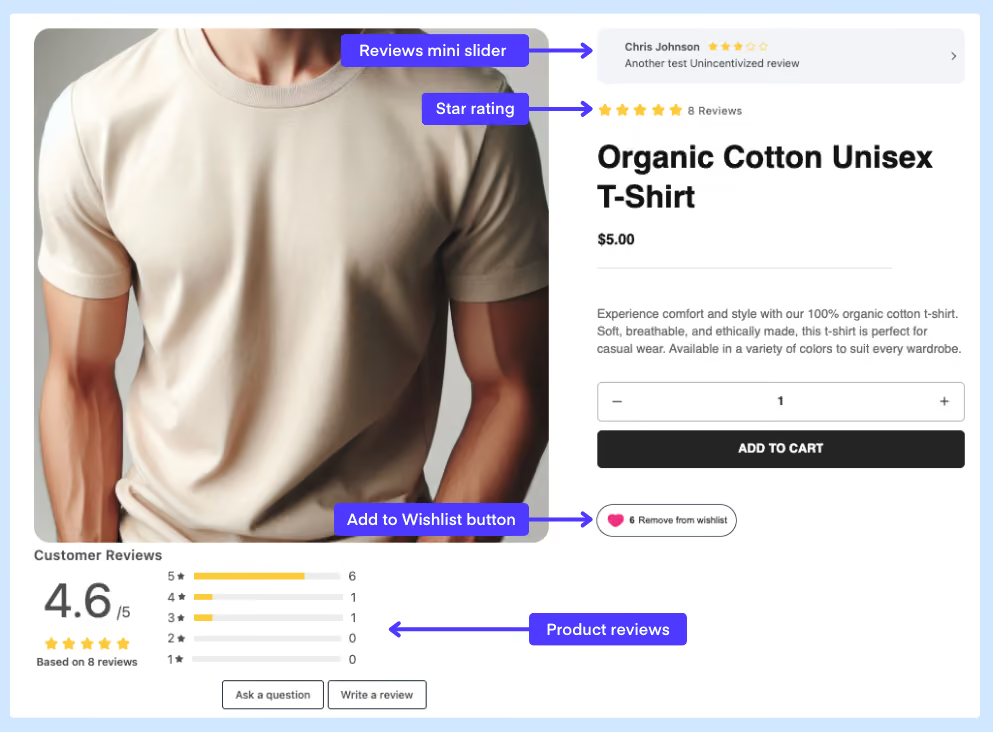
Display full product reviews on any GemPages page. Drag the Growave element into your layout, select Reviews widget, and your reviews appear exactly where you place them.


Drop Growave widgets into any GemPages layout with drag and drop. Reviews, star ratings, review sliders, and wishlist buttons, placed exactly where you want them.

Connect GemPages with Growave to embed review widgets, star badges, review sliders, and wishlist buttons into your custom pages, building social proof and loyalty directly into your store design.
Display full product reviews on any GemPages page. Drag the Growave element into your layout, select Reviews widget, and your reviews appear exactly where you place them.
Show reviews in a compact slider format, ideal for landing pages and above-the-fold sections where space is limited but social proof still matters.
Add an average rating badge to product pages so shoppers see your star rating at a glance, without scrolling to the full review section.
Let customers save products from any GemPages product page. Add the Growave wishlist button once per page and place it wherever it fits your layout best.

Yes. Unlike some page builders, GemPages lets you add multiple Growave widgets to the same page. Copy the Growave element, drag it to a new location, and select a different widget type for each instance.
Yes. Enable GemPages Theme Helper in your Shopify theme under Online Store, Theme, App embeds. Without it, widget styles may not render correctly on the published page.
Always select v.2 in the Growave element settings. Growave 1.0 is deprecated and no longer supported.