Reviews widget and slider
Display individual product reviews on any EComposer page, or switch to a compact slider format for landing pages where space is limited. Both are available as separate drag-and-drop elements.


Five Growave widgets available in EComposer's extension library. Drop reviews, star ratings, a review slider, wishlist, and shoppable Instagram galleries into any page layout.

Connect EComposer with Growave to place five distinct widgets across your custom pages, turning any product or landing page into a social proof and loyalty touchpoint.
Display individual product reviews on any EComposer page, or switch to a compact slider format for landing pages where space is limited. Both are available as separate drag-and-drop elements.
Add an average product rating badge to product pages so shoppers see your rating instantly, without scrolling to the full review section.
Let customers save products from any EComposer page. Supports custom CSS classes and works with Growave's wishlist notifications for back-in-stock and sale alerts.
Turn your Instagram content into a shoppable gallery on any page. Connect your Instagram account in Growave, copy the gallery ID, and embed it directly in EComposer.

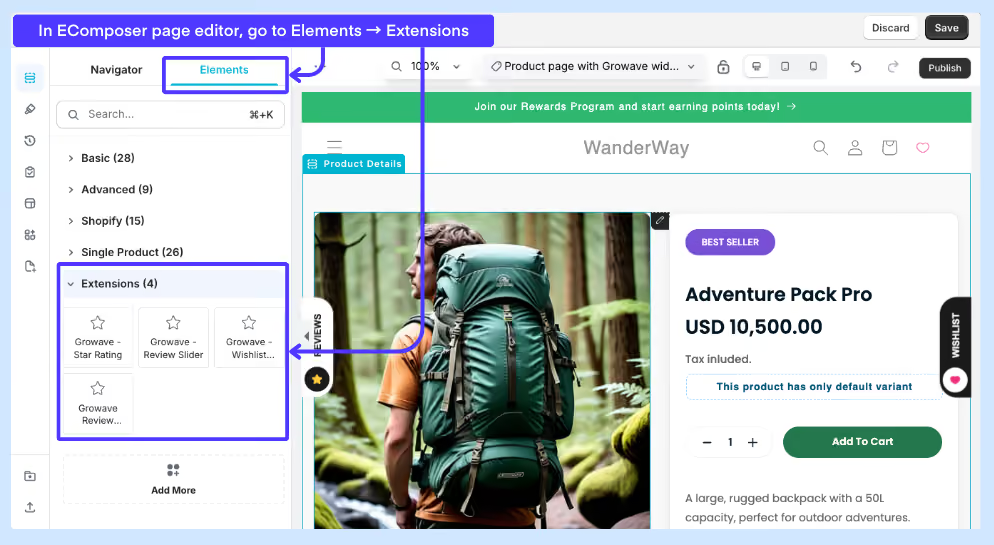
Yes. After installing EComposer, open the Extension Library, search for Growave, and install the widgets you want to use. This is a one-time step per store. After installation, all Growave widgets appear in the Extensions section of the EComposer elements panel.
Yes. Go to Shopify admin, Online Store, Edit code, App embeds, and toggle on EComposer Theme Helper. Without it, widget styles may not render correctly on published pages.
Yes. You can add as many different Growave widget types as you need on the same page. Simply drag each one from the Extensions panel and place it in your layout.

.svg)